Sunday, December 23, 2007

Easy steps to install Team Foundation Server 2005

finally installation of my TFS 2005 completed successfully. I was trying to install TFS 2005 from last 2 days but every time it gives me some error or some new requirement. from my total experience I summarised the steps here.

This is only for New BOX and single server deployment

  1. Install Microsoft Windows Server 2003 or 2003 R2 with SP2
    • Install IIS from windows components. enable ASP.NET, do not enable FrontPage extensions.
  2. Install MS SQL Server 2005 with all features.
    • Make sure that all services in MS SQL server set to Start automatically.
  3. Install Windows SharePoint service 2.0 with SP2
    • DO not configure WSS and select farm installation type
  4. Install MS SQL Server 2005 Service Pack 2
  5. Install .NET Framework 2.0 Service pack 2
  6. Create 2 accounts on server TFSSERVICE and TFSREPORTS (if you have a domain and using active directory then create these account in Active directory)
  7. Now time to start installation of TFS. if you are using domain controller then login in as domain admin and not local admin.
  8. Insert the TFS CD/DVD and start the installation.
    • First it will check the server health and necessary components, its nothing but what we did in above steps, if everything is fine then it will ask for login for services , enter TFSSERVICE login details then report service login details, enter TFSREPORTS then SMTP ( you can skip this for now)
    • Start installation
    • Finish installation
  9. Install Team Explorer.
  10. If you want to access TFS in Internet Explorer then download Team System Web Access Tool from Microsoft downloads site free of cost and install it, (chose different web site normally port 8090 or any other port and not default 8080)
  11. Install Team Foundation Server 2005 Service Pack 1
  12. Done !!! your server is ready to use.

DO Read TFS Installation guide (which comes in DVD or you can download new version from Microsoft web site) carefully before starting installation.

Saturday, December 22, 2007

ASP .NET 3.5 Namespaces

Commonly Used Types and Namespaces

System.Web
HttpApplication
HttpCookie
HttpRequest
HttpResponse
HttpRuntime
HttpServerUtility


System.Web.ApplicationServices NEW
AuthenticationService NEW
ProfileService NEW
RoleService NEW

System.Web.Caching
Cache

System.Web.ClientServices NEW
ClientFormsIdentity NEW
ClientRolePrincipal NEW
ConnectivityStatus NEW

System.Web.ClientServices.Providers NEW
ClientFormsAuthenticationMembershipProvider NEW
ClientRoleProvider NEW

System.Web.Compilation
BuildProvider

System.Web.Configuration
WebConfigurationManager NEW

System.Web.Hosting
ApplicationManager

System.Web.Management
WebBasedEvent

System.Web.Security
FormsAuthentication
FormsIdentity
Membership
Roles

System.Web.SessionState
HttpSessionState

System.Web.UI
Control
MasterPage
Page
ScriptManager NEW
System.Web.UI
UpdatePanel NEW
UpdateProgress NEW
UserControl

System.Web.UI.HtmlControls
HtmlButton
HtmlControl
HtmlForm
HtmlInputControl

System.Web.UI.WebControls
Content
DetailsView
FormView
GridView
LinqDataSource
ListView
LogIn
Menu
ObjectDataSources
TreeView
Wizard

System.Web.UI.WebControls.WebParts
WebPart

*New - New namespaces in .NET framework 3.5

Source:http://msdn.microsoft.com/netframework

Monday, December 17, 2007

PUG Community Day - December 2007

The second PUG Community Day (formally known as PUG Meet) was a big success. On 15th December around 40 people turned up for this and the feedback was really good. In this meet, we saw one 60 year old attendee with 30+ years of experience.

This time we had 3 tracks
The day began with Mobile and Embedded Device Track. In this track Mayur Tendulkar (Microsoft India) took a session on Managed Windows Mobile Development. In his session, he explained about Windows Mobile platform considerations for mobile development like memory, screen, disconnected environment, etc.

In second track i.e. Developer Track, Ravi Patel (MVP – ASP.Net) took a session on What Is New in ASP.Net 3.5. In his session, he demonstrated some nice demos on ASP.net Controls, AJAX, and Web Services in Visual Studio 2008.

In third track i.e. IT Pro track, Vikram Pendase (eZon Solutions), took a session on IIS7.0. In his session, he explained IIS7 installation, new features of IIS7 etc… He also showed some nice demos pertaining to IIS 7.0 like Authentications, SSL Certificates Installation, etc…

All in all, this was a successful event. We want to thank all the people involved in this community activity.
Photos are available at http://maheshm.spaces.live.com/photos/cns!809C8F1C43EFFD14!244/

We're planning to continue this initiative and the next PUG Community Day is planned on 5th Jan 2008. We are trying to add more tracks like SQL and Student track too…

Thursday, September 13, 2007

Vista - Remote Desktop Security Prompt

I'm using Windows vista ultimate edition from almost a year to connect to my windows server 2003 using Remote Desktop connection and it was working perfectly for me till last 15 days

last to last week my laptop was not feeling well so I decided to format it and reinstall vista and all software.

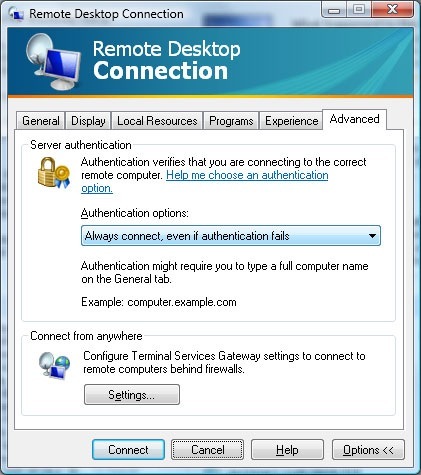
after reinstalling all when I try to connect to my server using Remote Desktop connection utility in vista. it prompts me a message-

---------------------------------------

Remote Desktop cannot verify the identity of the computer you want to connect to. This problem can occur if:
1) The remote computer is running a version of Windows that is earlier than Windows Vista.
2) The remote computer is configured to support only the RDP security layer.
Contact your network administrator or the owner of the remote computer for assistance.
Do you want to connect anyway?
---------------------------------------
when I saw the message, I thought that may be because of active directory membership, since before formatting my laptop I was member of the domain and after reinstalling I tried to connect to server before joining the domain. so I joined my domain first and then tried to connect to server using the Remote Desktop connection, still it showing me same message.

when I search it on Live Search, it doesn't shows me any useful results:( then I googled this and get one nice blog post about this problem by Scott Forsyth and a post by Rob Jonas at tweakvista


when you try to connect with remote desktop from vista to windows server, vista asks for authentication, but at server side in 2003 server there is no process to provide authentication, it refuses the request so the warning message appears.

this will get solved in upcoming server "windows server 2008" or codename longhorn which has Terminal Services Gateway.

for now Very simple solution this is:

click on the advanced tab in the Remote Desktop Connection tool and change the Authentication options to "Always connection, even if authentication fails".


and If you want to set this at the server level then you need to play with registry and make some changes in authentication level read more about this at Scott Forsyth blog.

Monday, September 03, 2007

DevCon 2007 Rocks!!!


Pune User Groups's
DevCon 2007


This is one event that continues to get better by the year. PUG started this initiative back in 2004 and had less than 300 students and approx 100 professionals attending this event. 25th August, 2007, Saturday it was time to set a new bench-mark with more close to 150 professionals and a whopping 1000+ students attending DevCon 2007 at COEP, Pune campus
The DevCon 2007 was organized by Pune User Group (PUG) in association with International .NET Association (INETA). It was supported by Microsoft India as well as the Technical Education Quality Improvement Program (TEQIP) project at College Of Engineering, Pune.


This event enjoyed sessions from speakers like Raj Chaudhuri, Nauzad Kapadia, Dhaval Faria and Sarang Datye. These speakers covered topics like Windows Communication Foundation, Windows Workflow Foundation, New features in Visual Studio 2008 and Project Mono, i.e. implementing .Net on LINUX platform.

This is the “MOST SUCCESSFUL DevCon” till date and this, DevCon 2007 has received very positive feedback. People from various companies and from almost all colleges in and around Pune city attended this event.

DevCon 2007 exceeded all my expectations. We had more than 1100+ attendees! I think this was one of the largest volunteer led community effort in this country and it feels awesome to be a part of this group of enthusiastic people. Our speakers got an average rating of 4 out of 5

Experience is the best teacher. We learn every time we do something different. This time it was suddenly huge crowd and the whole team managed very well. Infact I should say perfectly managed. I was really surprised by the energy showed by all.

Hats off to all my "Team Pune."