Showing posts with label Windows Server. Show all posts
Showing posts with label Windows Server. Show all posts
Thursday, January 19, 2012

Wednesday, December 30, 2009
VSTS 2008 SP1 and TFS SP1 New VPC Relesed
I am using a Visual Studio Team System 2008 / Team Foundation Server 2008 VPC (Trial) published by Microsoft from last December 2008 and now i was little worried as it suppose to expire on tomorrow 31st December, 2009. Even I planned to make my own VPC on this weekend so that i can continue my work on VSTS 2008. But today morning my friend Aviraj Ajagekar gave me a good news via his blog, Microsoft Released New VPC of VSTS 2008 SP1 and TFS 2008 SP1 with all new updates and tools for another 1 year Trial period,
here are details about this New VPC…
you can download this VPC file from Microsoft Download Center… this time they released VPC image in 2 format. as one classical Microsoft Virtual PC compatible and other one is Hyper-V compatible. check following links to download it.
DOWNLOAD HYPER-V IMAGES
DOWNLOAD VIRTUAL PC IMAGES (Required Software: Virtual PC 2007 SP1 or Virtual Server 2005 R2 SP1)
here are details about this New VPC…
you can download this VPC file from Microsoft Download Center… this time they released VPC image in 2 format. as one classical Microsoft Virtual PC compatible and other one is Hyper-V compatible. check following links to download it.
DOWNLOAD HYPER-V IMAGES
DOWNLOAD VIRTUAL PC IMAGES (Required Software: Virtual PC 2007 SP1 or Virtual Server 2005 R2 SP1)
Tuesday, October 21, 2008
Microsoft Press - "Free E-Book of the Month" offer!
For 25 years, Microsoft Press books have focused on helping you take your skills and knowledge to the next level. Celebrate our 25th Anniversary with a "Free E-Book of the Month" offer! Simply sign up for the Microsoft Press Book Connection Newsletter for notification of offers, register, and download the selection of the month.
 | Windows Server® 2008 TCP/IP Protocols and Services - http://csna01.libredigital.com/?urws8un4p7 |
 | Programming Microsoft Robotics Studio http://csna01.libredigital.com/?urrs4gt63d |
Thursday, September 13, 2007
Vista - Remote Desktop Security Prompt
I'm using Windows vista ultimate edition from almost a year to connect to my windows server 2003 using Remote Desktop connection and it was working perfectly for me till last 15 days
last to last week my laptop was not feeling well so I decided to format it and reinstall vista and all software.
after reinstalling all when I try to connect to my server using Remote Desktop connection utility in vista. it prompts me a message-
---------------------------------------
Remote Desktop cannot verify the identity of the computer you want to connect to. This problem can occur if:
1) The remote computer is running a version of Windows that is earlier than Windows Vista.
2) The remote computer is configured to support only the RDP security layer.
Contact your network administrator or the owner of the remote computer for assistance.
Do you want to connect anyway?
---------------------------------------
when I saw the message, I thought that may be because of active directory membership, since before formatting my laptop I was member of the domain and after reinstalling I tried to connect to server before joining the domain. so I joined my domain first and then tried to connect to server using the Remote Desktop connection, still it showing me same message.
when I search it on Live Search, it doesn't shows me any useful results:( then I googled this and get one nice blog post about this problem by Scott Forsyth and a post by Rob Jonas at tweakvista
when you try to connect with remote desktop from vista to windows server, vista asks for authentication, but at server side in 2003 server there is no process to provide authentication, it refuses the request so the warning message appears.
this will get solved in upcoming server "windows server 2008" or codename longhorn which has Terminal Services Gateway.
for now Very simple solution this is:
click on the advanced tab in the Remote Desktop Connection tool and change the Authentication options to "Always connection, even if authentication fails".

and If you want to set this at the server level then you need to play with registry and make some changes in authentication level read more about this at Scott Forsyth blog.
last to last week my laptop was not feeling well so I decided to format it and reinstall vista and all software.
after reinstalling all when I try to connect to my server using Remote Desktop connection utility in vista. it prompts me a message-
---------------------------------------
Remote Desktop cannot verify the identity of the computer you want to connect to. This problem can occur if:
1) The remote computer is running a version of Windows that is earlier than Windows Vista.
2) The remote computer is configured to support only the RDP security layer.
Contact your network administrator or the owner of the remote computer for assistance.
Do you want to connect anyway?
---------------------------------------
when I saw the message, I thought that may be because of active directory membership, since before formatting my laptop I was member of the domain and after reinstalling I tried to connect to server before joining the domain. so I joined my domain first and then tried to connect to server using the Remote Desktop connection, still it showing me same message.
when I search it on Live Search, it doesn't shows me any useful results:( then I googled this and get one nice blog post about this problem by Scott Forsyth and a post by Rob Jonas at tweakvista
when you try to connect with remote desktop from vista to windows server, vista asks for authentication, but at server side in 2003 server there is no process to provide authentication, it refuses the request so the warning message appears.
this will get solved in upcoming server "windows server 2008" or codename longhorn which has Terminal Services Gateway.
for now Very simple solution this is:
click on the advanced tab in the Remote Desktop Connection tool and change the Authentication options to "Always connection, even if authentication fails".
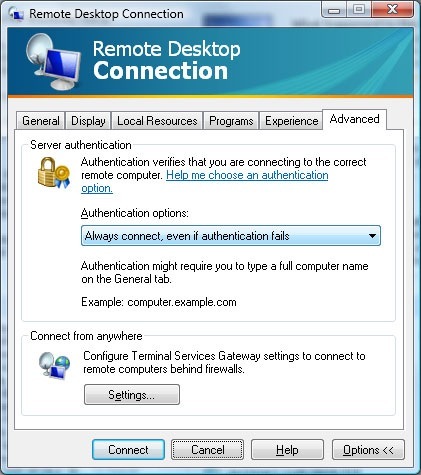
and If you want to set this at the server level then you need to play with registry and make some changes in authentication level read more about this at Scott Forsyth blog.
Subscribe to:
Posts (Atom)