Thursday, September 13, 2007

Vista - Remote Desktop Security Prompt

I'm using Windows vista ultimate edition from almost a year to connect to my windows server 2003 using Remote Desktop connection and it was working perfectly for me till last 15 days

last to last week my laptop was not feeling well so I decided to format it and reinstall vista and all software.

after reinstalling all when I try to connect to my server using Remote Desktop connection utility in vista. it prompts me a message-

---------------------------------------

Remote Desktop cannot verify the identity of the computer you want to connect to. This problem can occur if:
1) The remote computer is running a version of Windows that is earlier than Windows Vista.
2) The remote computer is configured to support only the RDP security layer.
Contact your network administrator or the owner of the remote computer for assistance.
Do you want to connect anyway?
---------------------------------------
when I saw the message, I thought that may be because of active directory membership, since before formatting my laptop I was member of the domain and after reinstalling I tried to connect to server before joining the domain. so I joined my domain first and then tried to connect to server using the Remote Desktop connection, still it showing me same message.

when I search it on Live Search, it doesn't shows me any useful results:( then I googled this and get one nice blog post about this problem by Scott Forsyth and a post by Rob Jonas at tweakvista


when you try to connect with remote desktop from vista to windows server, vista asks for authentication, but at server side in 2003 server there is no process to provide authentication, it refuses the request so the warning message appears.

this will get solved in upcoming server "windows server 2008" or codename longhorn which has Terminal Services Gateway.

for now Very simple solution this is:

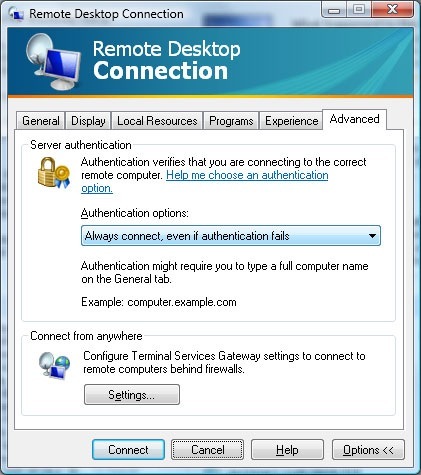
click on the advanced tab in the Remote Desktop Connection tool and change the Authentication options to "Always connection, even if authentication fails".


and If you want to set this at the server level then you need to play with registry and make some changes in authentication level read more about this at Scott Forsyth blog.

Monday, September 03, 2007

DevCon 2007 Rocks!!!


Pune User Groups's
DevCon 2007


This is one event that continues to get better by the year. PUG started this initiative back in 2004 and had less than 300 students and approx 100 professionals attending this event. 25th August, 2007, Saturday it was time to set a new bench-mark with more close to 150 professionals and a whopping 1000+ students attending DevCon 2007 at COEP, Pune campus
The DevCon 2007 was organized by Pune User Group (PUG) in association with International .NET Association (INETA). It was supported by Microsoft India as well as the Technical Education Quality Improvement Program (TEQIP) project at College Of Engineering, Pune.


This event enjoyed sessions from speakers like Raj Chaudhuri, Nauzad Kapadia, Dhaval Faria and Sarang Datye. These speakers covered topics like Windows Communication Foundation, Windows Workflow Foundation, New features in Visual Studio 2008 and Project Mono, i.e. implementing .Net on LINUX platform.

This is the “MOST SUCCESSFUL DevCon” till date and this, DevCon 2007 has received very positive feedback. People from various companies and from almost all colleges in and around Pune city attended this event.

DevCon 2007 exceeded all my expectations. We had more than 1100+ attendees! I think this was one of the largest volunteer led community effort in this country and it feels awesome to be a part of this group of enthusiastic people. Our speakers got an average rating of 4 out of 5

Experience is the best teacher. We learn every time we do something different. This time it was suddenly huge crowd and the whole team managed very well. Infact I should say perfectly managed. I was really surprised by the energy showed by all.

Hats off to all my "Team Pune."


Thursday, August 23, 2007

DevCon 2007 at Pune


Pune User Group in Association with International .NET Association (INETA) Presents


Date: 25th August, 2007

Venue:
Auditorium
College of engineering, Pune
Shivajinagar, Pune –5

Time:

Professional Track: - 09:00 AM - 02:00 PM
Student Track: - 02:30 PM - 07:30 PM

Entry Fees:Professional Track: Rs. 50/-
Student Track: Rs. 25/-

Agenda:

Professional Track:

1.Deep Dive Into Windows Communication Foundation (WCF)
2.Deep Dive Into Windows Workflow Foundation (WF)
3.What’s New In Visual Studio 2008 (ORCAS)

Student Track:

1.Deep Dive Into Windows Communication Foundation (WCF)
2.ASP.Net AJAX Primer
3.Implementing .Net on Linux Platform (Project Mono)


for Entry passes check your nearest location on
our website http://devcon.puneusergroup.org/
or Contact us at devcon2007@puneusergroup.org


DevCon is a Developer Conference from the developers, by the developers and for the developers. Developers may be professionals or students who will represent next generation developers.
• Meet with industry gurus.
• Check out all that the Microsoft Application Platform has to offer
• Explore advances in Web development with Microsoft ASP.NET AJAX.
• Get the inside scoop on the next release of Visual Studio and Microsoft SQL Server.
• Find out how your applications can take advantage of the improved UI and increased security of Windows Vista.
Questions or comments?

Monday, June 18, 2007

Outlook connector Beta for Free Hotmail Users

Finally a day come where people like me who simply loves to use Hotmail account for emails and also want to access Hotmail from MS Office outlook 2003 or 2007. This was not possible for Free Hotmail users, only paid subscribers can access hotmail mails from Outlook as a subscription service $19.95 a year. But now there is a Good News for us. Microsoft offering this service Free of cost.
Microsoft Just releases Outlook connecter (beta) for his Windows Live Hotmail Users.
You can use Microsoft Office Outlook 2003 or Microsoft Office Outlook 2007 to access and manage your Microsoft Windows Live Hotmail or Microsoft Office Live Mail accounts, including e-mail messages and contacts for free!
Outlook Connector Beta enables you to use your Live Hotmail accounts within Outlook:
Read and send your Office Live Mail/Windows Live Hotmail e-mail messages.
Manage your Live Mail Contacts.
Use advanced options for blocking junk e-mail messages.
Manage multiple e-mail accounts in one place.
It also allow you to synchronizes your outlook to your server that is any changes made to mails, contacts in Outlook will automatically synchronize with the web version in their Windows Live Hotmail account.

I tried this and its really working well, and fast too... This service uses standard Microsoft exchange MAPI and not POP/SMTP and also not crashes my Outlook as like Http based service crashes my outlook.

To use this is very simple,
Download outlook connecter Free of cost

http://www.microsoft.com/downloads/details.aspx?FamilyID=7aad7e6a-931e-438a-950c-5e9ea66322d4&displaylang=en
Install it (Microsoft office genuine users only).
Restart Outlook (if it’s running), else start outlook.
You can see New Menu added as Outlook connecter
Just click on Add New account in Outlook Connector menu.
Add you Hotmail Id, Password and your Name in the box and say OK ... that set
Wait for some time so that outlook can configure your account and generate folder structure for you
If you want to download full mail do that settings, by default it only downloads Headers.

Enjoy your Hotmail Mails in outlook. Now I’m waiting for calendar feature which is still Paid service. Hope so Microsoft will make that available Free by final version of this connecter

Tuesday, June 05, 2007

launch of shree sant seva sangha website

launch of Shree Sant Seva Sangha, Pune's website http://www.shreesantsevasangh.com by The Pioneer of the Param super computer Padmashree Dr. Vijay Bhatkar developed by my team at teknotika.